FREE · NO SIGN-UP · NOTHING TO INSTALL
Free Video Watermark Remover for Grok & Logos
Remove a fixed-position watermark from video online: the Grok preset finds the Grok mark for you, or you box a logo, timestamp or caption yourself. Free, with no sign-up and no length or file-size cap.
- Completely free
- No account needed
- Nothing to install
- No length or size cap
Use the latest desktop Chrome or Edge.
Only remove watermarks from videos you own or have the rights to edit.
Real results
See the Result Before You Start
Unedited frames from this tool. Check the watermark area for leftover marks and softness.
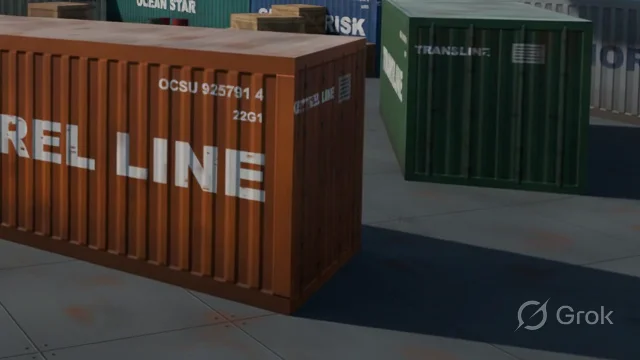 Original
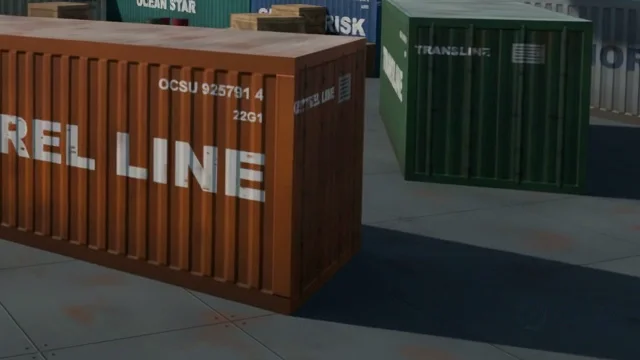 Processed
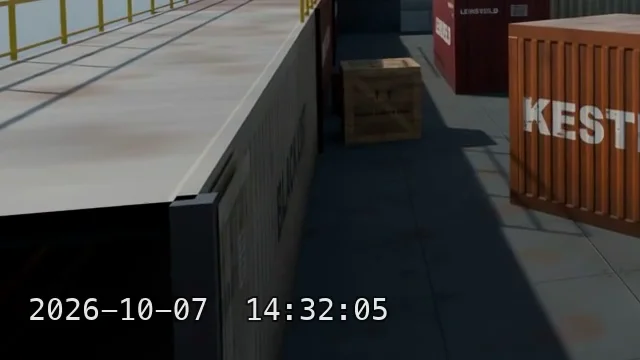 Original
 Processed
Grok preset
How the Grok Watermark Preset Works
Grok Imagine videos carry a semi-transparent Grok mark in the bottom-right corner. Because the overlay is blended in a known way, the preset reverses it instead of painting over it. Removing the Grok watermark may breach xAI's terms, even for videos you generated, so check the rules that apply to you first.
Finds the Mark Automatically
No box to draw. The preset locates the Grok watermark in the bottom-right corner, even when the video has been resized.
Reverses the Overlay
It recovers the pixels under the semi-transparent mark instead of inventing new ones, so the corner stays sharp and steady from frame to frame. Compare the preview with your original before saving.
AI Fill When Detection Fails
If the mark is not where it is expected, the corner is rebuilt with AI fill. Fill estimates new content and can alter details there, so check the preview.
How it works
How to Remove a Watermark from Video
No editing timeline and no masking skills. Mark the watermark once and every frame is processed for you.
- 01
Open Your Video
Choose or drop the video with the watermark. Long recordings and large files are fine.
- 02
Mark the Watermark
Keep the Grok preset to find the Grok watermark automatically, or switch to Custom area and drag a box over any fixed logo, timestamp or caption.
- 03
Remove the Watermark
Start removal. The Grok preset reverses the overlay; a custom box is rebuilt with AI fill in every frame. The audio is left as it is.
- 04
Preview & Download MP4
Compare the result with the original, then save an H.264 MP4 at the source resolution and frame rate.
Why this tool
A Free Watermark Remover Without Caps or Accounts
Typical online tools stamp their own logo on the export or stop after a few seconds. This one is free from the first frame to the last.
Free, with No Sign-Up
Open the page and start. No account, no card and no trial.
No Duration or File-Size Cap
Long recordings and big exports go through in one run. Processing time depends on your computer, and saving the result needs free disk space.
Original Resolution and Sound
The export keeps the source resolution, frame rate and audio. Only the watermark area is edited; the rest is re-encoded at a matching quality.
Grok Preset or Your Own Box
Use the Grok preset for Grok Imagine videos, or draw a box over a logo, timestamp, channel watermark or caption in any video.
Use cases
Remove Your Own Logos, Timestamps and Captions
Your Own Channel Logo
Reuse your own uploads on another platform or in a compilation without the channel watermark you burned in years ago.
An Old Logo After a Rebrand
Changed your name or logo? Remove the outdated logo from product demos and ads so every video matches the new brand, without a reshoot.
Timestamps on Dashcam and Screen Recordings
Erase the date and time watermark from dashcam footage, security clips or screen recordings before you edit or share the video.
AI Clips You're Allowed to Modify
Clean up AI videos whose terms let you change them, and keep any AI-content label that a platform or the law requires.
Tips
What Affects Watermark Removal Quality
Draw a Snug Box
Cover the watermark with a small margin and no more. A tight box leaves less to rebuild, so the result stays sharper.
Steady Shots Work Best
On steady shots, custom area removal blends each frame with the previous one, which reduces flicker. Fast motion behind the watermark is harder to hide.
Fixed Watermarks Only
The box stays in one place for the whole video, so a moving or bouncing watermark is not supported. Choose clips where the logo stays put.
Mind Busy Textures
A large box over text, leaves or patterned fabric may look soft. Plain or lightly textured backgrounds are easier to rebuild.
FAQ
Video Watermark Remover FAQ
Yes. There is no sign-up, no credits and no trial, no duration or file-size cap, and we never add a watermark to your download.
Yes, when the video carries the standard semi-transparent Grok mark in the bottom-right corner. The preset finds it and reverses the overlay; if it cannot find the mark, it falls back to AI fill on that corner. Removing the Grok watermark may breach xAI's terms; see the question about the rules below.
Not at the moment. The tool handles a watermark that stays in a fixed position, such as a corner logo, a timestamp or a burned-in caption. A watermark that moves around the frame is not supported.
The export keeps the source resolution, frame rate and audio, and only the watermark area is edited; the rest is re-encoded at a bitrate matched to the resolution. On heavily compressed video the Grok preset may leave a very faint trace, and AI fill over a large box can look soft or shimmer slightly.
No. Your video is processed on your computer and is not uploaded anywhere. Keep the page open until the download is ready.
It depends on the video and the rules that apply to it. Use this tool only on videos you own or have permission to edit, such as your own logo, an old channel watermark or a timestamp. xAI's Acceptable Use Policy forbids removing the Grok watermark, so doing so on Grok outputs can breach xAI's terms even if you generated the video. Keep AI-content disclosure wherever it is required, and never present AI-generated video as real footage.
Use the latest version of Chrome or Edge on a desktop or laptop computer.
Common formats such as MP4, MOV and WebM work, as long as Chrome or Edge can play the file. The cleaned video is saved as an H.264 MP4 and keeps your audio, converted to AAC when the source uses another codec.
Preview the Result on Your Video
Open a video, mark the watermark and compare before you download the MP4.
Choose a Video